
[USBpcap]USB流量分析脚本
修改自王一航(https://github.com/WangYihang)
sun@ubuntu:~/UsbKeyboardDataHacker$ tshark -r ./example.pcap -T fields -e usb.capdata
00:00:09:00:00:00:00:00
00:00:00:00:00:00:00:00
00:00:0f:00:00:00:00:00
00:00:00:00:00:00:00:00
00:00:04:00:00:00:00:00
00:00:00:00:00:00:00:00
00:00:0a:00:00:00:00:00
00:00:00:00:00:00:00:00
20:00:00:00:00:00:00:00
20:00:2f:00:00:00:00:00
...
由于原作大佬tshark分离的信息格式不一样,导致脚本无法在部分电脑上使用
经测试在现有的Windows和kali系统下tshark分离出的数据不带':',导致原作使用':'作为数据分片的代码无法使用
这里修改了一下代码
USBMiceDataHacker.py:
#!/usr/bin/env python
# coding:utf-8

import sys
import os
import numpy as np
import matplotlib.pyplot as plt

mousePositionX = 0
mousePositionY = 0
reload(sys)
sys.setdefaultencoding('utf-8')
X = []
Y = []

DataFileName = "usb.dat"
data = []

def main():
    global mousePositionX
    global mousePositionY
    # get argv
    pcapFilePath = sys.argv[1]
    action = sys.argv[2]

    if action != "LEFT" and action != "ALL" and action != "RIGHT" and action != "MOVE":
        action = "LEFT"

    # get data of pcap
    command = "tshark -r %s -T fields -e usb.capdata > %s" % (
        pcapFilePath, DataFileName)
    print command
    os.system(command)

    # read data
    with open(DataFileName, "r") as f:
        for line in f:
            data.append(line[0:-1])

    # handle move
    for i in data:
       # Bytes = i.split(":")
        if len(i) == 16:
            horizontal = 2  # -
            vertical = 4  # |
        elif len(i) == 8:
            horizontal = 1  # -
            vertical = 2  # |
        else:
            continue
        offsetX = int(i[4:6], 16)
        offsetY = int(i[8:10], 16)
        if offsetX > 127:
            offsetX -= 256
        if offsetY > 127:
            offsetY -= 256
        mousePositionX += offsetX
        mousePositionY += offsetY
        if i[2:4] == "01":
            # print "[+] Left butten."
            if action == "LEFT":
                # draw point to the image panel
                X.append(mousePositionX)
                Y.append(-mousePositionY)
        elif i[2:4] == "02":
            # print "[+] Right Butten."
            if action == "RIGHT":
                # draw point to the image panel
                X.append(mousePositionX)
                Y.append(-mousePositionY)
        elif i[2:4] == "00":
            # print "[+] Move."
            if action == "MOVE":
                # draw point to the image panel
                X.append(mousePositionX)
                Y.append(-mousePositionY)
        else:
            # print "[-] Known operate."
            pass
        if action == "ALL":
            # draw point to the image panel
            X.append(mousePositionX)
            Y.append(-mousePositionY)

    fig = plt.figure()
    ax1 = fig.add_subplot(111)

    ax1.set_title('[%s]-[%s] Luz' % (pcapFilePath, action))
    ax1.scatter(X, Y, c='r', marker='o')
    plt.show()

    # clean temp data
    os.system("rm ./%s" % (DataFileName))

if __name__ == "__main__":
    main()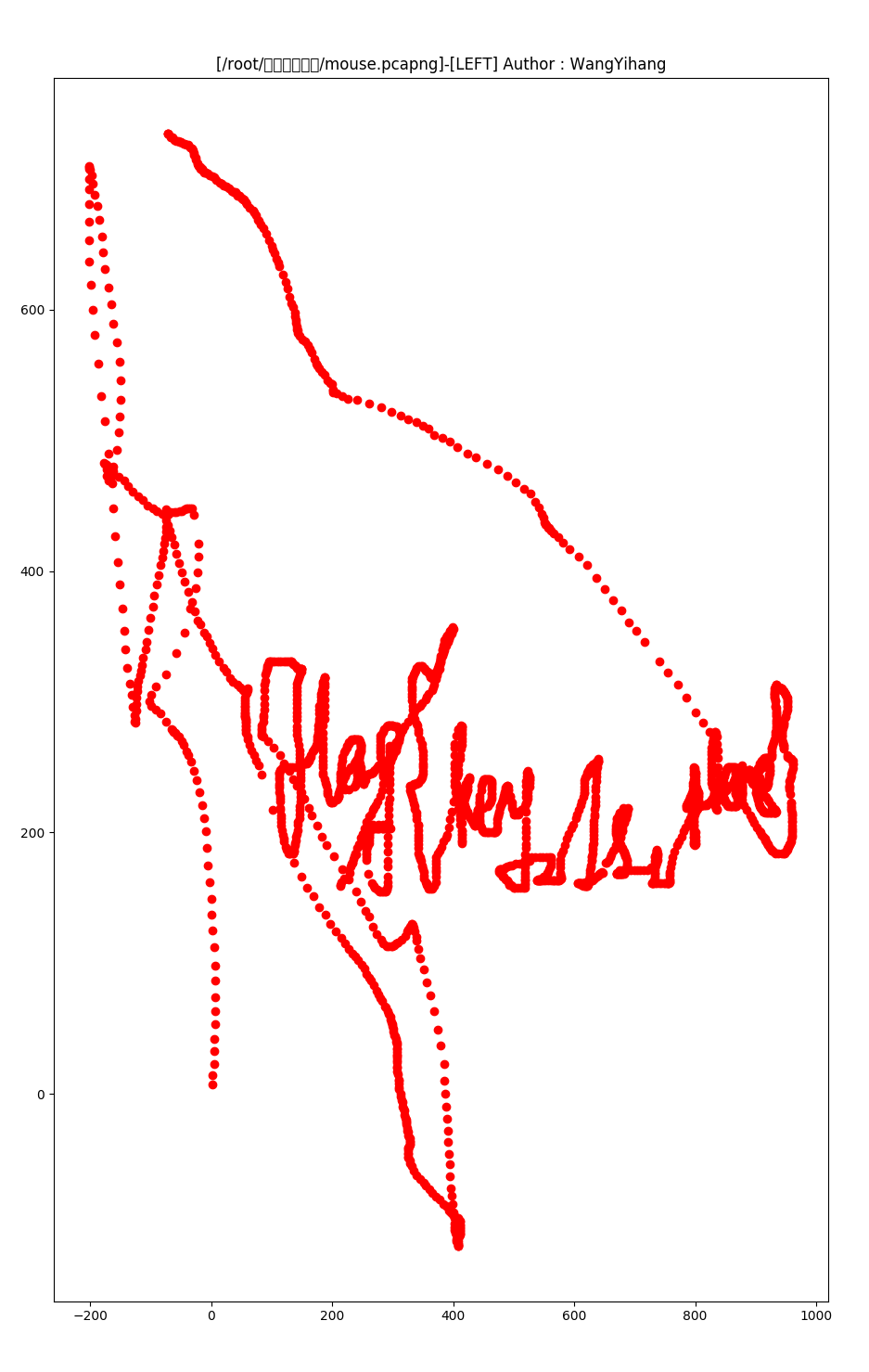
USBKeyboardDataHacker.py:
#!/usr/bin/env python
#coding:utf-8
#coding:utf-8
import sys
import os
import re

DataFileName = "usb.dat"

presses = []

normalKeys = {"04":"a", "05":"b", "06":"c", "07":"d", "08":"e", "09":"f", "0a":"g", "0b":"h", "0c":"i", "0d":"j", "0e":"k", "0f":"l", "10":"m", "11":"n", "12":"o", "13":"p", "14":"q", "15":"r", "16":"s", "17":"t", "18":"u", "19":"v", "1a":"w", "1b":"x", "1c":"y", "1d":"z","1e":"1", "1f":"2", "20":"3", "21":"4", "22":"5", "23":"6","24":"7","25":"8","26":"9","27":"0","28":"<RET>","29":"<ESC>","2a":"<DEL>", "2b":"<tab>","2c":"<SPACE>","2d":"-","2e":"=","2f":"[","30":"]","31":"\\","32":"<NON>","33":";","34":"'","35":"<GA>","36":",","37":".","38":"/","39":"<CAP>","3a":"<F1>","3b":"<F2>", "3c":"<F3>","3d":"<F4>","3e":"<F5>","3f":"<F6>","40":"<F7>","41":"<F8>","42":"<F9>","43":"<F10>","44":"<F11>","45":"<F12>","4f":"<右方向>","50":"<左方向>","51":"<下方向>","52":"<上方向>"}

shiftKeys = {"04":"A", "05":"B", "06":"C", "07":"D", "08":"E", "09":"F", "0a":"G", "0b":"H", "0c":"I", "0d":"J", "0e":"K", "0f":"L", "10":"M", "11":"N", "12":"O", "13":"P", "14":"Q", "15":"R", "16":"S", "17":"T", "18":"U", "19":"V", "1a":"W", "1b":"X", "1c":"Y", "1d":"Z","1e":"!", "1f":"@", "20":"#", "21":"$", "22":"%", "23":"^","24":"&","25":"*","26":"(","27":")","28":"<RET>","29":"<ESC>","2a":"<DEL>", "2b":"<tab>","2c":"<SPACE>","2d":"_","2e":"+","2f":"{","30":"}","31":"|","32":"<NON>","33":"\"","34":":","35":"<GA>","36":"<","37":">","38":"?","39":"<CAP>","3a":"<F1>","3b":"<F2>", "3c":"<F3>","3d":"<F4>","3e":"<F5>","3f":"<F6>","40":"<F7>","41":"<F8>","42":"<F9>","43":"<F10>","44":"<F11>","45":"<F12>","4f":"<右方向>","50":"<左方向>","51":"<下方向>","52":"<上方向>"}

def main():
    # get argv
    pcapFilePath = sys.argv[1]

    # get data of pcap
    os.system("tshark -r %s -T fields -e usb.capdata > %s" % (pcapFilePath, DataFileName))

    # read data
    with open(DataFileName, "r") as f:
        for line in f:
            presses.append(line[0:-1])
    # handle
    result = ""
    for press in presses:
        print press
	press=press.replace(":","",-1)
	print "press[0:2] "+press[0:2]
	try:
		b="0x"+str(press[0:2])
		print b
		a=int(b,16)
		if press[0:2] == "00":
		    print press[4:6]
		    if press[4:6]!= "00" and normalKeys.get(press[4:6]):
		        result += normalKeys[press[4:6]]
		elif a & 2 or a & 32: # shift key is pressed.
		    if press[4:6] != "00" and normalKeys.get(press[4:6]):
		        result += shiftKeys[press[4:6]]
		else:
		    print("[-] Unknow Key : %s" % (press[4:6]))
	except:
		print("1")
    print("[+] Found : %s" % (result))

    # clean the temp data
    os.system("rm ./%s" % (DataFileName))


if __name__ == "__main__":
    main()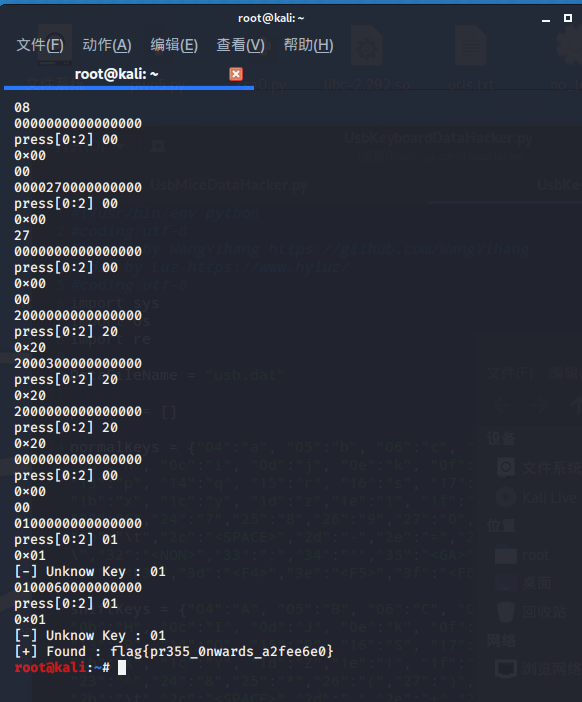
基于王一航大佬的脚本略作修改,使用方法与原作相同。