
调用百度文心千帆API的简单对话程序
百度的文心千帆出来了,个人感觉还是比不上CHAT GPT 3.5,但是好歹充钱方便了。
写了个demo玩玩,用python-flask做后端,实现对话交互。
app.py
from flask import Flask, render_template, request, jsonify, make_response
import requests
import uuid

app = Flask(__name__)

# 替换成您的API Key和Secret Key
API_KEY = ""
SECRET_KEY = ""

# 获取access_token
TOKEN_URL = f"https://aip.baidubce.com/oauth/2.0/token?grant_type=client_credentials&client_id={API_KEY}&client_secret={SECRET_KEY}"
response = requests.get(TOKEN_URL)
ACCESS_TOKEN = response.json()["access_token"]

# 定义ERNIE-Bot聊天接口地址
CHAT_API_URL = f"https://aip.baidubce.com/rpc/2.0/ai_custom/v1/wenxinworkshop/chat/completions?access_token={ACCESS_TOKEN}"
user_chat_histories = {}
@app.route("/")
def index():
    sessionid = str(uuid.uuid4())[:16]  # 生成随机的16位sessionid
    resp = make_response(render_template("index.html"))
    resp.set_cookie("sessionid", sessionid)  # 将sessionid存储在Cookie中
    return resp

@app.route("/chat", methods=["POST"])
def chat_with_ernie_bot():
    # 从前端获取用户输入的对话内容和sessionid
    user_id = request.cookies.get("sessionid")
    user_input = request.json["user_input"]
    # 获取该用户的对话历史,如果用户是首次对话,则新建一个空列表作为其对话历史
    user_history = user_chat_histories.get(user_id, [])

    # 将用户输入添加到对话历史中
    user_history.append({"role": "user", "content": user_input})
    # 调用ERNIE-Bot聊天接口
    headers = {"Content-Type": "application/json"}
    data = {"messages": user_history}
    print(user_id,data)
    response = requests.post(CHAT_API_URL, headers=headers, json=data)
    result = response.json()["result"]
    print(result)
    user_history.append({"role": "assistant", "content": result})
    user_chat_histories[user_id] = user_history
    return jsonify({"response": result})

if __name__ == "__main__":
    app.run(host='0.0.0.0',port=13333,debug=False)
index.html
<!DOCTYPE html>
<html>
<head>
    <title>ERNIE-Bot Chat</title>
    <script src="https://www.hyluz.cn/marked.min.js"></script>
</head>
<body>
    <h1>ERNIE-Bot Chat</h1>
    <div id="chat-container">
        <div id="chat-history"></div>
        <input type="text" id="user-input" placeholder="输入您的消息..." />
        <button id="send-button" onclick="sendMessage()">发送</button>
    </div>

    <script>
        const chatHistory = document.getElementById("chat-history");
        const userInput = document.getElementById("user-input");

        function getCookie(name) {
            const value = "; " + document.cookie;
            const parts = value.split("; " + name + "=");
            if (parts.length === 2) return parts.pop().split(";").shift();
        }

        function addMessageToChatHistory(role, message) {
            const messageElement = document.createElement("div");
            messageElement.className = role;
            messageElement.innerHTML = marked.parse(message);
            chatHistory.appendChild(messageElement);
        }

        function sendMessage() {
            const userMessage = userInput.value.trim();
            if (!userMessage) {
                return;
            }

            const userId = getCookie("sessionid");

            addMessageToChatHistory("user", "用户: " + userMessage);

            fetch("/chat", {
                method: "POST",
                headers: {
                    "Content-Type": "application/json",
                },
                body: JSON.stringify({ "user_id": userId, "user_input": userMessage }),
            })
            .then(response => response.json())
            .then(data => {
                const botResponse = data.response;
                addMessageToChatHistory("assistant", "GPT: " + botResponse);
            })
            .catch(error => {
                console.error("Error:", error);
            });

            userInput.value = "";
        }
    </script>
</body>
</html>
运行示例
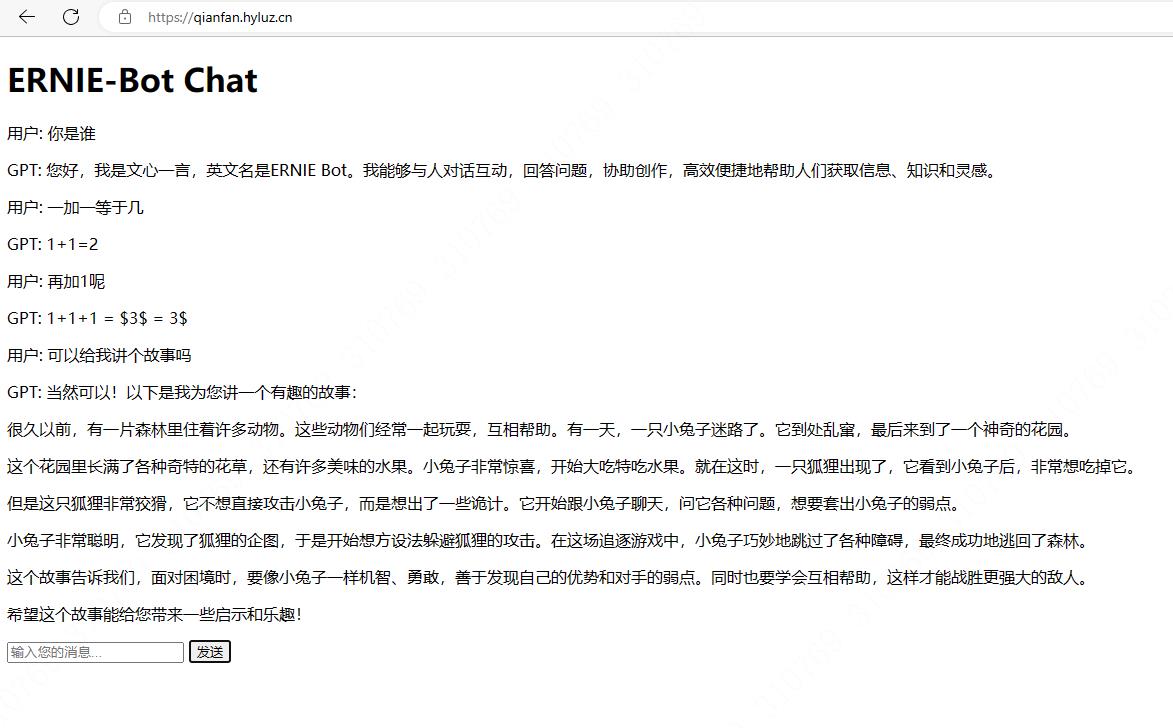
简单实现了一下,也不说多精致了,算是粗制烂造吧。
体验demo:https://qianfan.hyluz.cn/ 二十块体验额度用完为止